
Download Supreme Auto Checkout – Chrome Extensions, Auto Checkout, Supreme
Overview
Supreme Auto Checkout is a Google Chrome extension designed to streamline the online shopping experience for users aiming to secure limited-edition products from the Supreme retail platform. The tool automates key steps in the purchasing process, including cart addition, checkout navigation, and form filling, which are often time-sensitive during high-demand product drops. By reducing manual input and minimizing delays, the extension aims to increase the likelihood of successful purchases during fast-moving online releases.
Targeted primarily at enthusiasts and collectors who participate in frequent Supreme drop events, the software serves as a utility for those seeking efficiency and consistency in their shopping workflows. Its features are tailored to the unique challenges of high-traffic e-commerce environments, where seconds can determine whether a product is secured or sold out. The extension is developed by the Supreme Auto Checkout Team, a group focused on providing automation tools for competitive online retail scenarios.
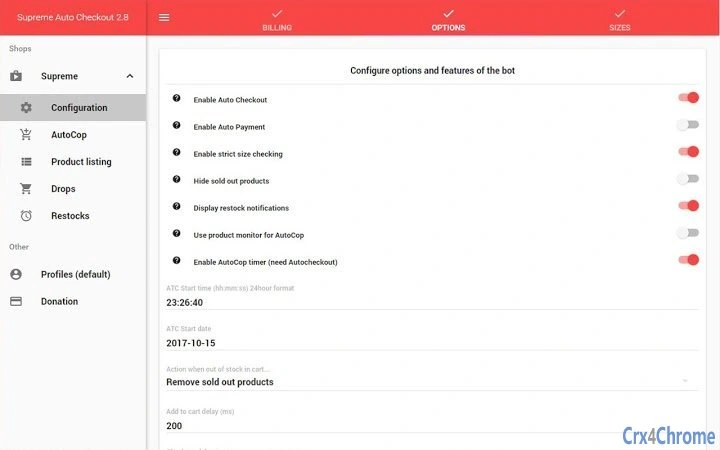
Real-world usage includes preparing for drop days by configuring profiles, setting restock alerts, and enabling keyword monitoring for specific products. Users can also leverage the tool to manage multiple accounts or shipping configurations, allowing for rapid switching between different purchase scenarios. The extension supports various product categories and offers customizable settings, such as price thresholds and automatic hiding of sold-out items, enhancing the overall shopping experience.
Key Features & Capabilities
- Auto Checkout: Automatically adds the selected product to the cart and proceeds directly to the checkout page, eliminating manual navigation and reducing the risk of missing the purchase window.
- AutoFill: Populates billing and shipping details automatically on the checkout form, saving time and minimizing input errors during high-pressure situations.
- Multi Profiles: Allows users to create and switch between multiple user profiles, each with customized settings for different accounts, addresses, or payment methods.
- Configurable Delays: Enables users to set custom delays for each step of the checkout process, which can be adjusted to match network speed or server response times.
- Size Selection: Offers the ability to choose sizes for different product categories, ensuring the correct item is selected during automated purchase attempts.
- Price Filtering: Includes options to set minimum and maximum price thresholds, helping users avoid purchasing items outside their desired budget range.
- Sold-Out Product Hiding: Automatically hides out-of-stock items from view, reducing clutter and improving focus during product discovery.
- AutoCop: Monitors the Supreme shop for specific keywords and automatically adds matching products to the cart when they become available.
- Restock Monitor: Sends notifications when a previously sold-out product returns to inventory, enabling users to act quickly on restocked items.
- Drop List: Provides a curated list of upcoming product drops, helping users plan their shopping strategy in advance.
These features collectively enhance workflow efficiency, especially during high-demand events. For example, a user can set up a profile with their preferred shipping details and enable AutoCop for a specific product line. When the item appears, the extension automatically adds it to the cart and proceeds through checkout, all while applying configured delays to avoid detection or timeouts. The ability to monitor multiple products and manage different profiles makes it a versatile tool for dedicated collectors.
User Interface, Workflow & Performance
The user interface of Supreme Auto Checkout is designed to integrate seamlessly within the Google Chrome browser environment. It operates as a browser extension, appearing in the browser’s toolbar with a compact, functional layout. Navigation is straightforward, with a settings panel accessible through the extension’s icon, where users can configure all available features.
Workflow efficiency is a core strength of the tool. From setup to execution, users can define profiles, set keywords, and configure delays with minimal effort. The extension’s automation logic is triggered based on user-defined conditions, such as the appearance of a product or a restock event, ensuring timely responses without requiring constant user attention.
Performance details were not specified by the developer. However, as a Chrome extension with a file size of 2.3 MB, it is expected to operate with minimal system impact. The developer did not provide additional system requirements or resource usage data. General software behavior patterns suggest stable operation under normal browser conditions, though actual performance may vary depending on network speed, browser load, and the complexity of configured settings.
Compatibility & System Requirements
Supreme Auto Checkout is compatible with Windows, Mac, and Linux operating systems, making it accessible to a broad range of users across different platforms. The extension is designed specifically for the Google Chrome browser, ensuring full functionality within that environment.
The software has a file size of 2.3 MB, indicating a lightweight installation. The version is 1.0.0, released on July 1, 2024. Exact system requirements were not listed, but the developer did not specify any hardware or software dependencies beyond the Chrome browser.
Compatibility information is limited to the supported operating systems and browser environment. Users should ensure they are running the latest version of Google Chrome to maximize compatibility and security. The extension may not function properly on outdated or non-standard browser configurations.
Pros and Cons
Pros
- Automates critical steps in the Supreme shopping process, reducing manual effort.
- Supports multiple profiles for efficient switching between accounts and settings.
- Includes advanced features like restock monitoring and AutoCop for keyword-based product tracking.
- Configurable delays help users adapt to varying network and server conditions.
- Free to download and use, with no upfront cost for core functionality.
- Lightweight installation at 2.3 MB, suitable for most systems.
Cons
- Limited to the Google Chrome browser, restricting use on other platforms.
- Dependent on Supreme’s website structure; changes to the site may affect functionality.
- Automation features may violate Supreme’s terms of service, posing potential account risks.
- Does not provide real-time performance metrics or usage analytics.
- No official support channels or documentation were provided in the input.
FAQ Section
Is Supreme Auto Checkout compatible with all browsers?
Supreme Auto Checkout is designed specifically for the Google Chrome browser. It may not function on other browsers such as Firefox, Safari, or Edge.
Is the software safe to use?
As a browser extension, its safety depends on the source and permissions granted. Users should only install it from trusted sources and review the requested permissions carefully.
Does the extension require a subscription or payment?
No, the software is available for free. There are no hidden fees or subscription models associated with the core features.
Can I use Supreme Auto Checkout offline?
While the extension can be installed offline, it requires an active internet connection to monitor product availability, process checkouts, and communicate with Supreme’s servers.
How often does the extension update?
Updates are released as needed to maintain compatibility with Supreme’s website changes. The latest version is 1.0.0, released on July 1, 2024.
Final Thoughts + CTA
Supreme Auto Checkout presents a powerful solution for users seeking to automate their shopping experience on the Supreme platform. With its comprehensive set of features—including auto checkout, profile management, restock monitoring, and keyword-based product tracking—it addresses the core challenges of fast-paced online product drops. The tool is particularly beneficial for dedicated collectors and enthusiasts who participate in frequent drop events and value speed and consistency.
While it is limited to Chrome and carries potential risks related to terms of service violations, its free availability, lightweight design, and intuitive workflow make it a compelling option for the target audience. The ability to customize every step of the process ensures users can tailor the automation to their specific needs.
For anyone serious about securing Supreme products during high-demand releases, this extension offers a significant advantage. Download Supreme Auto Checkout now.







